

 Pubblicato da
 GFI ha annunciato la disponibilità del Kerio Connect 10.1.0 “early access” (beta pubblica).
Questa versione modifica il modo in cui Outlook interagisce con Kerio Connect. La modalità KOFF Online mantiene Outlook connesso in tempo reale al server, anziché a una copia locale della casella di posta. Il risultato è un’esperienza Outlook più leggera, veloce e reattiva; la differenza è particolarmente evidente con caselle di posta di grandi dimensioni e nuovi profili.
È possibile accedere alla build qui: Kerio Connect 10.1.0
Novità principali della versione 10.1.0
Modalità KOFF Online (beta)
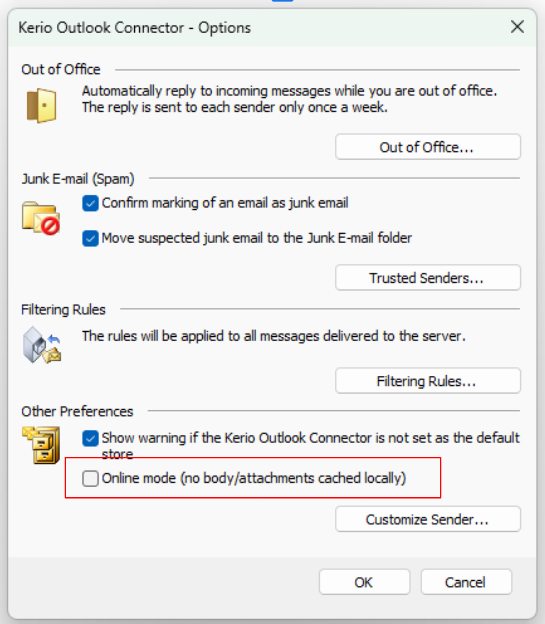
La modalità KOFF Online è una nuova modalità di esecuzione di Kerio Outlook Connector che non utilizza la cache. La posta rimane sul server e le operazioni, inclusa la ricerca, vengono eseguite direttamente sul server. Outlook interagisce in tempo reale con la casella di posta, in modo simile a Kerio Webmail, senza la necessità di un database locale di supporto.
- Circa il 99% in meno di dati locali. Non vengono memorizzati cache locale o indici di ricerca sulla macchina dell’utente.
- Pronta in pochi minuti. Intestazioni e anteprime si sincronizzano in background e i messaggi completi vengono aperti su richiesta; di conseguenza, un nuovo profilo è utilizzabile in pochi minuti anziché in ore.
- Ricerca sempre aggiornata. La ricerca viene eseguita sul server direttamente sulla casella di posta attiva, garantendo risultati sempre aggiornati.
- Più semplice e affidabile. Senza un archivio locale da gestire, si riducono drasticamente le possibili problematiche lato client.
- Nota: la modalità Online si attiva per singolo profilo nelle opzioni di Kerio Outlook Connector. La modalità Cached rimane l’impostazione predefinita ed è possibile tornare a essa in qualsiasi momento.
🍎
Pacchetto nativo Apple Silicon (ARM64) per macOS
Kerio Connect ora funziona in modo nativo sui Mac con chip Apple Silicon (M1 e successivi) e non richiede più l’emulatore Rosetta 2, di cui Apple ha annunciato la progressiva dismissione. Il server di posta, i relativi servizi, i motori antivirus e antispam e i componenti basati su Java (messaggistica istantanea e ricerca full-text) vengono eseguiti come codice nativo ARM64. Lo stesso vale per il programma di installazione.
- Nuovo programma di installazione: kerio-connect-10.1.0-mac-arm64.dmg, fornito insieme a quello per Intel (kerio-connect-10.1.0-mac.dmg).
- Richiede macOS 11 (Big Sur) o versioni successive. Un unico pacchetto supporta tutte le generazioni di Apple Silicon.
- Aggiornamento diretto (in-place). L’installazione del pacchetto Apple Silicon su una versione Intel già presente sullo stesso Mac mantiene inalterate la configurazione e l’archivio dei messaggi.
OAuth 2.0 per il download POP3 (Microsoft 365 e Google Workspace)
Microsoft 365 e Google Workspace stanno dismettendo l’autenticazione tramite password per il protocollo POP3. Gli account configurati per il download POP3 possono ora autenticarsi tramite OAuth 2.0, garantendo così la continuità nel recupero della posta da tali caselle. Consultare le note di rilascio complete.
Nel complesso, questa versione include 3 nuove funzionalità, 1 correzione di sicurezza e 27 tra correzioni di bug e miglioramenti.
Note per gli amministratori
Dopo l’aggiornamento, Kerio Connect non visualizza più la propria versione nell’intestazione HTTP del server Webmail o nei messaggi di benvenuto dei protocolli di posta. Per ripristinarne la visualizzazione, impostare ShowServerVersion su 1 nella sezione Misc del file mailserver.cfg e riavviare il servizio.
Per il download POP3 tramite OAuth2, è necessario registrare l’URI di reindirizzamento https://<tuo_server>/oauth2/callback nella registrazione dell’app su Microsoft Entra o Google Cloud prima di autorizzare l’account.
MyKerio è stato rimosso da WebAdmin. La gestione centralizzata è ora affidata a GFI AppManager.
Kerio Connect 10.1.0 — Release Notes
New feature — KOFF Online mode (beta)
- KOFF Online mode (beta): a new cache-less mode for the Outlook connector. Mail stays on the server, cutting the local data footprint by ~99% and eliminating the local cache and search index behind most KOFF sync and search issues. Message headers and previews sync in the background, full messages open on demand, and search runs on the server, so a new profile is ready in minutes instead of hours. Switch it on per profile in the Kerio Outlook Connector options; the standard cached mode remains the default and can be restored at any time.
New feature — OAuth 2.0 for POP3 Download (Microsoft 365 and Google Workspace)
- POP3 Download accounts can now sign in with OAuth 2.0 instead of a stored password. Microsoft 365 and Google Workspace have been phasing out password sign-in for POP3, so mail collected from those mailboxes into Kerio Connect can now use the sign-in method they require. In WebAdmin, under Configuration > Delivery > POP3 Download, each account has a new POP3 authentication choice: Basic Authentication (as before) or OAuth2. For OAuth2 you enter the Client ID, client secret, scopes and the provider’s authorization and token endpoints from your Microsoft Entra or Google Cloud app registration, then click Authorize Account to sign in through the provider in a browser pop-up; the editor shows the redirect URI (https://<your server>/oauth2/callback) that must be registered with the provider. Kerio Connect renews the access token automatically. If renewal fails, for example after consent is revoked, an “OAuth token renewal failed” notice is delivered to the account’s delivery mailbox and the account must be authorised again in WebAdmin. Existing Basic and APOP POP3 accounts and SMTP relay are unaffected.
New feature — Native Apple Silicon (ARM64) package for macOS
- Kerio Connect now runs natively on Apple Silicon Macs. A separate Apple Silicon installer (kerio-connect-<version>-mac-arm64.dmg) is provided alongside the Intel installer (kerio-connect-<version>-mac.dmg). The mail server, its services, the anti-virus and anti-spam engines and the Java-based components (instant messaging, full-text search) all run as native ARM64 code, and the installer itself runs natively, so Rosetta 2 is no longer required for the server. The Apple Silicon package requires macOS 11 (Big Sur) or later; all Apple Silicon generations (M1 and later) are supported by the same package. Installing the Apple Silicon package over an existing Intel installation on the same Mac upgrades it in place and keeps the configuration and message store. Intel Macs continue to use the Intel package, which is unchanged.
Security fixes
- Fixed a Webmail vulnerability where a specially crafted HTML email could run script when the message was opened, without any user action. HTML attributes are now escaped correctly.
Bug fixes
Webmail
- Fixed the signature editor (Settings > Mail > Signature): images can now be inserted into the signature and the “Edit HTML source” button works.
- Fixed toggling full-screen while composing a new message clearing the recipients in the To field.
- Fixed HTML emails showing raw style and script text in the message preview and in plain-text copies of the message.
- Fixed links in calendar invitations that wrap across lines showing as broken, non-clickable text.
- Fixed a calendar event sometimes showing the description of a previously opened event.
- Fixed the attachment list in the compose window and the message preview being clipped to a thin strip with no scrollbar when a message has many attachments.
- Fixed missing and incorrect translations across all 14 supported languages, including German special characters, the Portuguese login page falling back to English, Spanish Outlook connector messages, and Slovak settings labels. New administration features (encryption, mailbox clean-up, two-factor authentication, GFI AppManager) are now translated.
Calendar
- Fixed meeting links in HTML invitation descriptions being cut off at the first uppercase letter, and web addresses in the Location field wrapped across lines not being joined back into one clickable link. Video-conferencing links with query parameters, paths and fragments are now handled correctly.
- Fixed CalDAV clients (Apple Calendar, Thunderbird, DAVx5 and others) piling up connections and exhausting the server’s connection limit while a calendar folder was being re-indexed. The server now answers with a short “try again later” response that clients honour, instead of holding the connection open.
KOFF (Outlook)
- Fixed KOFF crashing during full-text indexing when a message property could not be read or a local store file was unreadable. Indexing now logs the item and continues.
- Fixed the default signature not being kept per account on recent Outlook 2024 builds.
Mobile devices (ActiveSync)
- Fixed meeting cancellations sent from a mobile device not removing the meeting from attendees’ calendars.
- Fixed a cancelled meeting appearing as an attendee copy instead of the organizer’s own event.
- Fixed an attendee deleting a meeting from their own calendar cancelling the meeting for everyone.
- Fixed devices that repeatedly re-sent long-running sync requests exhausting the server’s connection limit; a new request from the same device now replaces the previous one.
Calendar and EWS clients
- Fixed eM Client and other EWS-based clients failing to list items, showing free/busy in the wrong time zone, and being unable to accept meeting invitations.
Directory / GAL
- Fixed a directory user mapped into more than one Kerio domain showing only one address in the Global Address List instead of one contact per domain.
Integrations (EWS)
- Fixed HubSpot’s Exchange calendar integration failing to connect after the initial folder lookup; the server now supports the SendItem, GetInboxRules and CreateItem operations these integrations use.
Server
- Fixed the Let’s Encrypt certificate renewal hanging when two renewal or issue operations ran at the same time, which left the server on the old certificate.
- Fixed whole-server local archiving silently skipping messages when many messages arrived at once. The archive copy now waits longer for the archive folder (30 seconds by default), and any message that still cannot be archived is written to the Error log.
- Fixed “Clear log” in WebAdmin leaving rotated log files (.log.1, .log.2, …) on disk.
- Fixed corrupted statistics databases causing repeating errors in the log after an update. A corrupted statistics database is now detected, backed up and rebuilt automatically.
- Mail delivered to a local mailbox that is briefly busy now waits for the configured SMTP delivery retry interval (30 minutes by default) instead of retrying immediately.
- The server no longer reveals its version in the Webmail HTTP Server header or in the mail-protocol greetings. This applies to all servers after upgrading. To show the version again, set ShowServerVersion to 1 in the Misc section of mailserver.cfg and restart the service.
WebAdmin
- Accounts > Users search now also matches a user’s additional email addresses (aliases), not only the login name and full name.
- Fixed the Greylisting “Learn more” link and the links in the initial configuration wizard (reseller lookup, trial and purchase pages) pointing to outdated addresses.
- MyKerio, the discontinued Kerio cloud management service, has been removed from WebAdmin. Central management is provided by GFI AppManager.